

Konjo Bet has gained a following among players in Ethiopia partly through its mobile app, which packages the sportsbook and casino into one download rather than requiring a browser tab. The app is currently built for Android only; iPhone owners get a home-screen shortcut instead, covered further down this page.
App configuration
| Detail | Value |
|---|---|
| Platform | Android (APK) |
| Version | 1.0.0 |
| File size | About 45.8 MB |
| Last updated | 28/09/2026 |
| App store rating | 4.9 out of 5, as shown on the download page |
| iOS app | None — use the Safari home-screen shortcut below |
APK · ~45.8 MB · Android
How to install the Konjo Bet APK on Android
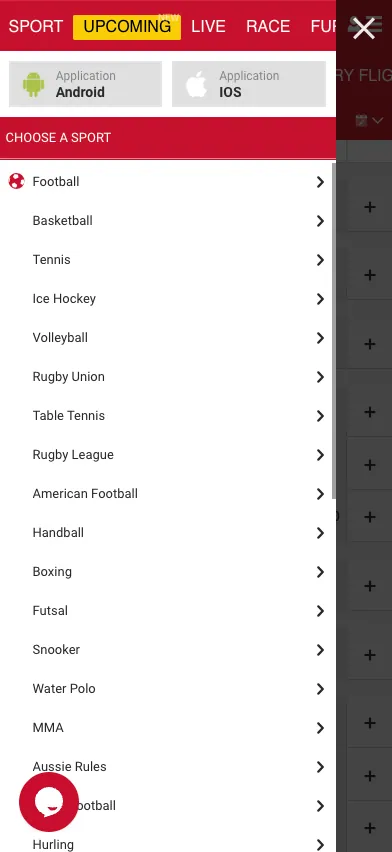
Android blocks installs from outside the Play Store by default, so the first step is telling the phone to trust this one file.
- Open the phone's Settings, then Security (or Apps > Special app access on newer versions), and turn on installs from unknown sources for the browser being used.
- Open the Konjo Bet site in that browser and tap the Android app button.
- Download the APK file — about 45.8 MB, so a stable connection helps.
- Open the downloaded file from the notification bar or the Downloads folder.
- Tap Install and wait for it to finish; confirm any prompt that appears.
- Open the app, then register or log in with an existing phone number and password.
How to install Konjo Bet on iOS
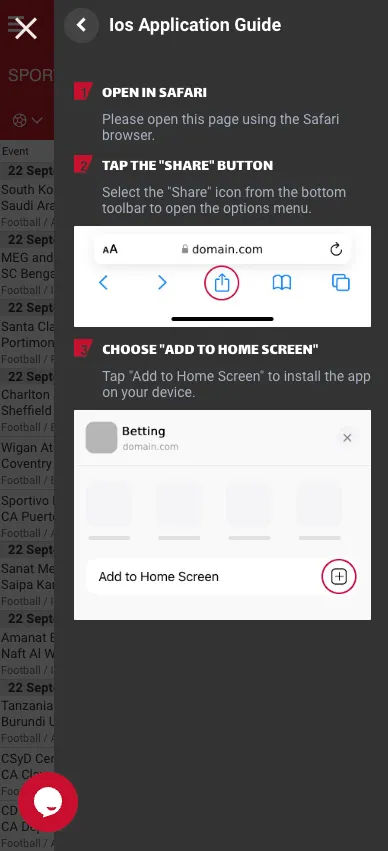
There's no dedicated iOS app in the App Store. Instead, the site offers a home-screen shortcut that opens full-screen, without the usual Safari address bar, much like a native app.
- Open the Konjo Bet site in Safari — this only works in Safari, not Chrome or another browser.
- Tap the Share icon in the bottom toolbar.
- Choose Add to Home Screen from the menu.
- Confirm the name and tap Add; an icon appears on the home screen that opens the site directly.
What the app can do
Once installed, the Android app carries the full sportsbook — pre-match and live odds, the betslip described on Sport — alongside the casino lobby, account and messages sections, and the cashier for deposits and withdrawals. It mirrors the mobile site closely rather than offering an entirely separate interface, so anyone familiar with the mobile browser will recognise the layout immediately.
App vs. mobile site
| Android app | Mobile browser | |
|---|---|---|
| Access | One tap from a home-screen icon | Type or bookmark the site address |
| Layout | Same menus and screens as the mobile site | Same menus and screens as the app |
| Install size | About 45.8 MB, one-time download | No install, loads fresh each visit |
| Updates | Manual — download the latest APK when one is released | Always the current version automatically |
In practice the two are close to interchangeable; the app's main advantage is convenience rather than extra features. Data usage between the two should be similar as well, since both load the same underlying pages — neither was measured directly for this guide, so treat that as a reasonable assumption rather than a confirmed figure. Anyone on a limited data plan is better off judging by their own usage over a few sessions than by a number quoted here.
Updates and common problems
To update the app, download the latest APK from the site again and install it over the existing one — Android treats this as an update rather than a fresh install, so account data isn't affected. If installation fails, double-check that unknown sources are still enabled, since some phones reset that setting after a system update. An app that won't open after installing is usually fixed by a restart or by redownloading the file, since a partial download is a common cause, particularly over a slower mobile connection where the 45.8 MB file can time out partway through. Login problems almost always come down to the phone number or password field, so double-check both before assuming something is broken — the same phone number and password used on the website work in the app, so a password reset on one carries over to the other — and use the password recovery option covered on Registration if needed. Notifications about settled bets or promotions weren't confirmed either way during this review, so anyone relying on the app to alert them to a result should check that setting directly in the app rather than assume it's on by default.
The app runs smoothly on most recent Android phones, with a simple layout and a manageable download size for slower connections. For funding the account, see Payments; for creating one in the first place, Registration covers the signup form step by step.
Frequently asked questions
How do I download the Konjo Bet app?
Open the Konjo Bet site on an Android phone, tap the Android app button and download the APK file directly — no app store is involved.
Is the Konjo Bet app available for iOS?
No dedicated iOS app exists. iPhone users can add the mobile site to their home screen from Safari instead, which opens like an app without an address bar.
How big is the Konjo Bet APK file?
About 45.8 MB for version 1.0.0.
Why won't the Konjo Bet APK install?
Almost always because installs from unknown sources are disabled. Enable that setting for the browser used to download the file, then try again.
How do I update the Konjo Bet app?
Download the latest APK from the site and install it over the existing app; this updates it without losing account data.
Does the Konjo Bet app work differently from the mobile site?
No — the app mirrors the mobile site's menus and screens closely. The main difference is a one-tap home-screen icon instead of opening a browser.
What can I do inside the Konjo Bet app?
Place sports bets, play casino games, deposit and withdraw through the cashier, and manage the account, the same as on the website.